

[Order] Specifying the ship date
Select one of the three shipping preference options, then click the "Next" button.

Overall view
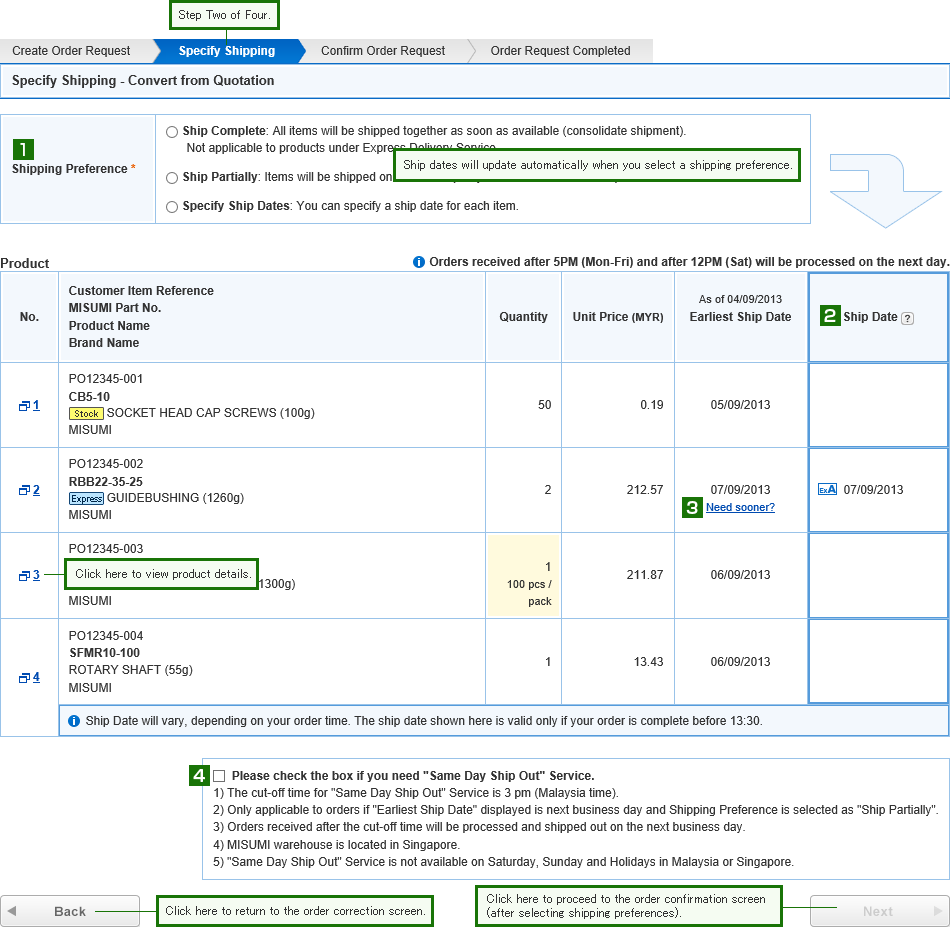
- Shipping Preference
-
Specify your preferred shipping method.
The "Next" button will change to orange to allow you to proceed to the confirmation screen.
If You Select:
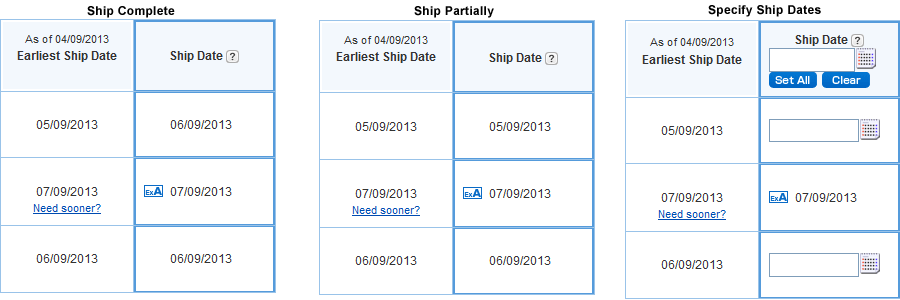
Ship Complete All items will ship together, as soon as the last item is available.
Ship Partially Each item will ship as soon as it is available.
Specify Ship Dates Each item will ship on the date you specify.
- Ship Date
-
This chart show the differences between Shipping Preference selections:
- Need Sooner?
-
If this link appears, an Express service option is available.
Click "Need Sooner?" if you would like to ship earlier than the currently displayed date.
Specify the express service in the popup window. - Same Day Ship Out Service
-
This Service is not available on Saturday, Sunday and Holidays in Malaysia or Singapore and the cut-off time is 3 pm (Malaysia time).
Only applicable to orders if "Earliest Ship Date" displayed is next business day and Shipping Preference is selected as "Ship Partially".
Orders received after the cut-off time will be processed and shipped out on the next business day.
| Next ⇒ Order confirmation |
|---|